The Input Bottleneck
We are living in an era of exponential speeds of token generation, yet our primary method of interfacing with that power has plateaued. We communicate with super-intelligent models using a 19th-century invention: the QWERTY keyboard.
There is a fundamental mismatch in our input/output bandwidth:
- Speaking Speed: The average person speaks at ~150 words per minute (WPM).
- Typing Speed: The average professional types at ~40 WPM.
Even if you are a fast typist hitting 70+ WPM, you are still throttling your thoughts by half. We think in streams of consciousness, but we force those thoughts through a mechanical funnel that can only capture a fraction of the fidelity.
The Cognitive Friction of “Writing”
The problem isn’t just speed; it’s the cognitive load.
Writing has a high bar compared to thinking out loud. When you sit down to write, your brain switches modes. You worry about structure, grammar, linear coherence, and tone—all before you’ve even finished the sentence. This creates friction that stops ideas from flowing freely. You edit while you draft, which is the enemy of creativity.
Speaking is native to the brain. It allows for non-linear, rapid-fire exploration. You can talk through a complex problem, backtrack, and refine your logic in real-time. But historically, capturing that flow has been painful.
Why We Stopped Talking (The “Dumb” Dictation Problem)
If speaking is 3x faster and cognitively easier, why aren’t we all dictating our code and emails?
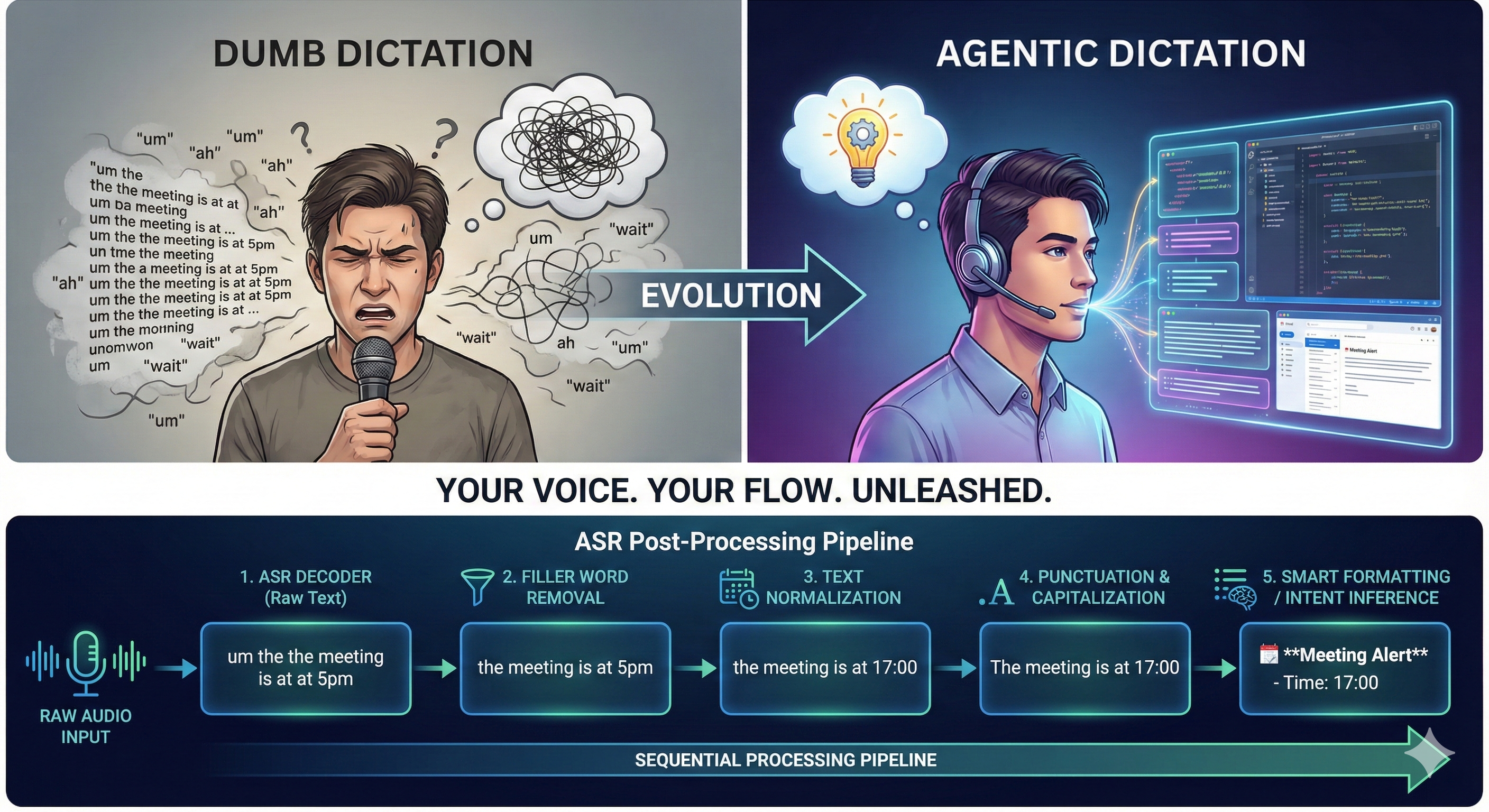
Because traditional transcription is dumb. “Dumb” transcription creates a literal record of your speech, including every “um,” “ah,” false start, and awkward pause. The result is a messy block of text that takes longer to edit than it would have taken to type.
This creates a psychological barrier. Users feel anxiety about “sending a prompt with filler words” or pasting a stream-of-consciousness mess into a reply to an email. The friction of cleaning up the text cancels out the speed of creating it.
Enter “Agentic Dictation”
We need to move beyond transcription to translation. We need a layer of intelligence between the microphone and the text editor.
This is Agentic Dictation:
- Intent Inference: It removes the “umms” and reconstructs the sentence based on what you meant, not just what you said.
- Smart Formatting: It recognizes when you are listing items and automatically bullets them. It detects when you are dictating code and formats it as a block.
- Velocity editing: It allows you to “talk to edit” (e.g., “Change the meeting time to 5 instead of 4:30”).
This solves the anxiety problem. You can ramble, stutter, and think out loud, trusting the AI to distill the signal from the noise.
Use Cases: The Flow State
When we unlock Agentic Dictation, we unlock two distinct personas:
1. The “Vide-coding” Developer
You are deep in a coding session (Cursor/VS Code) and need to prompt a coding agent about a bug or feature to be implemented.
- Old Way: Describe the feature or bug in a prompt, perhaps using provided features to enhance the context, but ultimately typing it out manually.
- New Way: Hold a key. Speak the feature or bug freely and explain the possible causes for the bug (think out loud). Watch it appear as a perfectly formatted prompt.
2. The “Velocity” Executive
You are walking between meetings or driving. You have 5 minutes to clear your inbox or reply to Slack.
- Old Way: Type short, terse replies with typos, or wait until you’re at a desk (blocking the team).
- New Way: Dictate full, nuanced responses. The agent formats them into professional prose. You clear the bottleneck without stopping moving.
Building the Pipeline
To build true agentic dictation, one cannot simply rely on raw speech-to-text. One has to build a post-processing pipeline.
ASR (Automatic Speech Recognition) post-processing pipelines follow a sequential order to refine raw transcriptions from the core speech recognition decoder. Typically starting with basic cleanup and progressing to semantic enhancements, this order minimizes error propagation while improving readability and accuracy. [1][2]
Sequential Stages
- Filler Word and Disfluency Removal: Eliminate hesitations like “um,” “uh,” repetitions, or false starts to streamline the text early. [3][4]
- Text Normalization: Convert spoken variants (e.g., numbers as words, dates, or abbreviations) to standard written forms. [5]
- Punctuation Restoration: Insert periods, commas, question marks, and capitalization using prosodic cues and language models. [1][4][6]
- Truecasing and Capitalization: Adjust case for proper nouns, sentence starts, and acronyms beyond basic punctuation. [6]
- Spelling and Grammar Correction: Apply language models to fix homophones, grammatical errors, or context inconsistencies. [7]
- Speaker Diarization: Label speakers (“Speaker 1:”, “Speaker 2:”) in multi-speaker audio, often integrated mid-pipeline. [2]
- Language Identification: Detect and switch languages or handle code-switching if not pre-determined. [2]
- Domain-Specific Enhancements: Boost vocabulary for named entities or jargon via custom lexicons. [2]
- Final Formatting: Add confidence scores, inverse text normalization, or output structuring for applications. [3]
Why Sequential?
You might ask: Why can’t we just throw all the audio at a large model and have it spit out the perfect text?
The answer lies in latency and the fragility of the “keyboard replacement” illusion. To successfully adopt voice dictation, the solution needs to return text in under 500ms. However, using a single Large Language Model (LLM) to handle transcription, editing, and formatting in one pass often takes 1+ seconds. That is too slow.
To hit our speed targets, we must modularize the post-processing into specialized stages, using the fastest tool for each specific task. However, while these steps are modular, they cannot be parallelized. They must be sequential primarily to minimize error propagation [3][4].
If we feed raw, noisy transcriptions directly into complex semantic models, the noise (fillers, stuttering, lack of punctuation) acts as “poison” to the downstream logic. For example:
- If you don’t remove “umms” and repetitions first (Step 1), a grammar correction model (Step 5) might interpret the repetition as a grammatical structure and try to “fix” it incorrectly.
- If you don’t normalize “twenty-four” to “24” (Step 2), a domain-specific formatter (Step 8) might fail to recognize it as a data point.
By treating this as a modular pipeline, we ensure that each stage receives cleaner input than the last. We sanitize the signal before asking the AI to interpret the meaning.
The Latency Dilemma: The 700ms Wall
Here lies the engineering challenge.
We have established that we need a sequential pipeline to make the text “smart.” But every step in that pipeline adds milliseconds.
To function as a true “keyboard replacement,” the interaction must feel instantaneous. If the time between you finishing your sentence and the text appearing on screen exceeds ~700ms, the illusion breaks. Your brain registers the lag. You start to doubt if the system heard you. You hesitate. The flow state collapses.
The Math of Disappointment:
- ASR Transcription: ~200-300ms
- Edge-to-Cloud Network Trip: ~100ms
- Sequential Pipeline Processing: ~100-200ms
- LLM “Agentic” Rewrite: ~500ms+
If we stack these linearly, we are looking at 1+ seconds of latency. For a user trying to “edit at the speed of thought,” that is an eternity.
This creates a massive dilemma: We need the smarts of the pipeline to minimize errors, but we need the speed of raw input to make it usable. If we cannot compress this entire ASR + LLM + Roundtrip loop under 700ms, Agentic Dictation will struggle to cross the chasm from “novelty toy” to “daily driver.”
Conclusion
Voice interaction is bifurcating. Voice Agents are great for delegation—asking a computer to do something for you. But Voice-to-Editor is for creation—using your voice to paint thoughts onto the screen faster than your fingers can move.
Agentic dictation is critical because it is the only interface that respects the speed of your mind. But building it requires solving the hardest problem in UI: delivering heavy compute at the speed of a keystroke.
References
- What is Automatic Speech Recognition? | NVIDIA Technical Blog
- Speech Pipeline Stages - Spokestack
- Speech-to-Text (STT) Pipeline Architecture - DeepQuery
- Post-processing in automatic speech recognition systems - Webex Blog
- Automatic speech recognition - Hugging Face
- How Automatic Speech Recognition Works - Vatis Tech
- Post-processing speech-to-text transcripts - ZHAW