RAG From Scratch – Research to Production
This series bridges the gap between AI research and software engineering. It moves from the high-level intuition of Large Language Models to the low-level systems engineering required to build deterministic, production-grade RAG pipelines.
- Part 1: Revolutionizing Question-and-Answer Systems (RAG Intuition) – The mental model of the “Student” and the “Librarian.”
- Part 2: Building RAG: All Things Retrieval – The basics of Vector Stores and Search.
- Part 3: Deep Dive: Keyword Search – Understanding BM25 and the math of “exact match.”
- Part 4: RAG Systems Engineering: The Structure-Aware Data Pipeline – Fixing the “Garbage In” problem with logical chunking.
- Part 5: Beyond Vectors: Sparse Embeddings & SPLADE – Solving the “Vocabulary Mismatch” problem.
- Part 6: RAG Architecture: The “Union + Rerank” Pipeline – Orchestrating Hybrid Search for production.
In the previous article, we established that RAG is reading comprehension: the LLM is the “Student” and retrieval is the “Librarian” handing the exact page.
This brings us to the second, equally important character in our system: The Librarian.
If the Student (LLM) is going to answer the question correctly, the Librarian (Retriever) must find the exact page of the textbook containing the answer. If the Librarian hands over the wrong page, the Student fails, no matter how smart they are.
In this article, we will move beyond high-level concepts and explore the technical implementation of this Librarian: how to organize the books (Chunking) and how to find the right page (Hybrid Search).
Step 0: The Art of “Chunking”
Before we can even search through our data, we have to decide how to store it. Many developers make the mistake of ingesting whole documents (PDFs, PPTs) as single units This leads to immediate failure:
-
Too Large: If you retrieve a 50-page document, the LLM will be overwhelmed with noise (the “Lost in the Middle” phenomenon).
-
Too Small: If you retrieve a single sentence, you miss the necessary context to answer the question.
We need a “Goldilocks” zone—small enough to be precise, but large enough to contain the answer. This process is called Chunking.
The “Sliding Window” Strategy
The biggest risk in chunking is cutting a sentence in half or separating a question from its answer.
- Bad Chunking: Chunk 1 ends with “The revenue was…” and Chunk 2 starts with “$5 million.” The meaning is lost.
- Sliding Window: We create overlaps. Chunk 1 covers sentences A-B-C. Chunk 2 covers sentences B-C-D.
This redundancy ensures that the semantic meaning is never sliced in half at the edge of a chunk.
Step 1: The Three Librarians (Search Algorithms)
Once our data is chunked, how do we find what we need? Research in this area has evolved significantly. We can think of the different search methods as different types of librarians.
1. The “Literal” Librarian (Keyword Search)
This is the traditional search we’ve used for decades (BM25). It matches exact words.
- Pros: Precise. If you search for a specific Product ID “XJ-900”, it finds exactly that.
- Cons: It doesn’t understand meaning. If you search “How do I start the car?”, it might miss a document titled “Ignition Guide” because the word “start” isn’t in the title.
2. The “Conceptual” Librarian (Vector Search)
This is the modern approach using Embeddings. It matches meaning rather than words.
- Pros: It understands synonyms. It knows “start” and “ignition” are related.
- Cons: It can be “fuzzy.” It struggles with specific jargon, acronyms, or exact matches (like names or serial numbers) that a general model hasn’t seen before. For example, in the automotive industry, “leasing” and “buying” have distinct legal meanings that a general model might conflate.
3. The Hybrid Approach
Since both methods have blind spots, the best practice is to combine them. This is Hybrid Search. However, implementing it introduces a difficult math problem that trips up many developers.
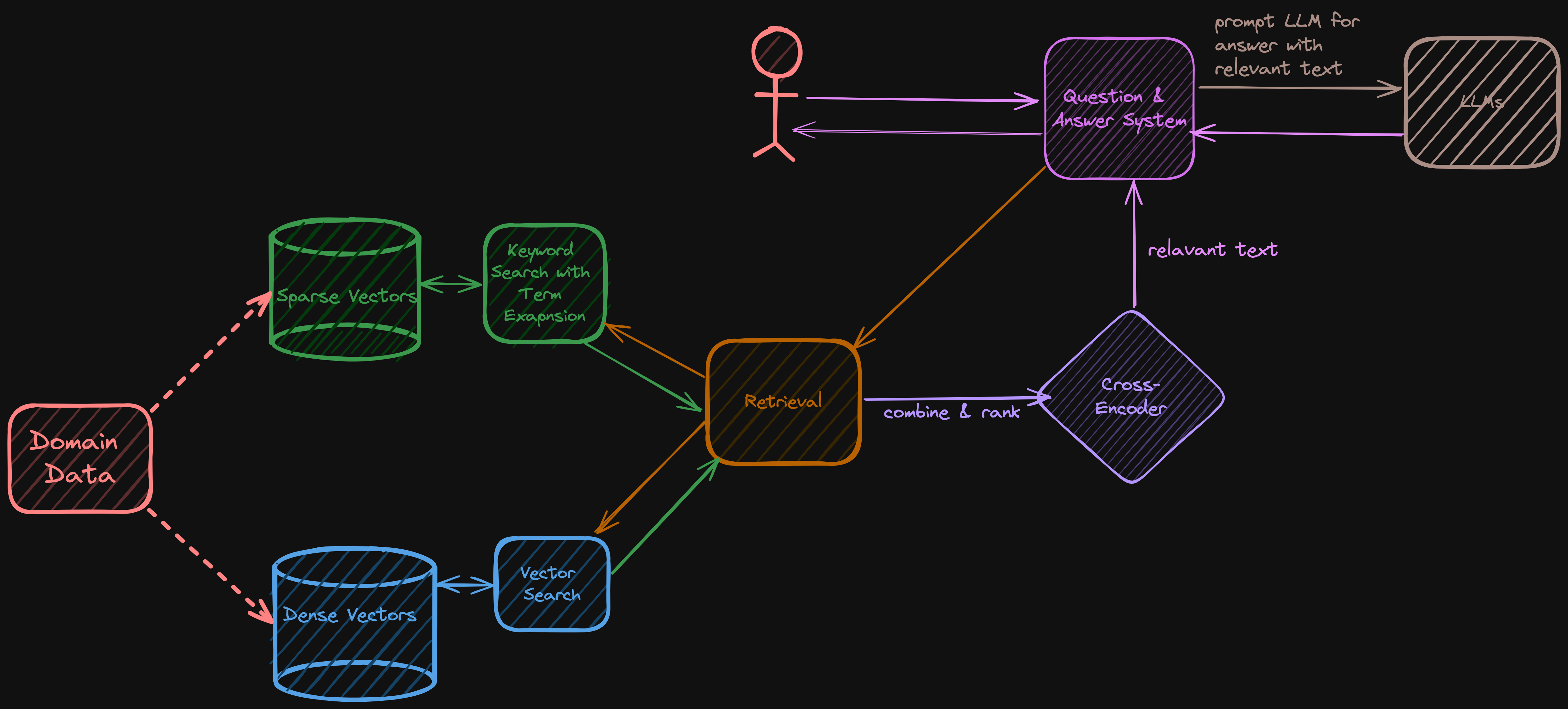
The “Math Problem” of Hybrid Search
You might think you can just add the scores together, but you can’t.
- Vector Search (Cosine Similarity) returns a score between 0 and 1 (e.g., 0.85).
- Keyword Search (BM25) returns a score that can theoretically range from 0 to infinity (e.g., 4.2 or 15.5).
If you simply add them (0.85 + 4.2), the Keyword score completely dominates. You need a way to normalize these two completely different scoring systems.
The Solution: Reciprocal Rank Fusion (RRF)
The industry standard for solving this is an algorithm called Reciprocal Rank Fusion (RRF).

Instead of looking at the raw scores, RRF looks at the rank position.
- It doesn’t care that the Vector score was
0.85; it cares that it was the #1 result. - It doesn’t care that the Keyword score was
4.2; it cares that it was the #1 result.
RRF takes the rank from List A and the rank from List B and fuses them into a new, unified ranking. This ensures that a document appearing at the top of both lists rises to the top of the final answer.
The Final Polish: SPLADE (The Translator)
Even with Hybrid Search, we still face the Vocabulary Mismatch problem. People use different words to describe the same topic.
Traditional Keyword search tries to fix this with “synonym dictionaries,” but these are hard to maintain.
Enter SPLADE (Sparse Lexical and Expansion Models). Think of SPLADE as a “Translator” that sits between the user and the search engine. It uses an LLM to automatically “expand” the query.
If the user types “car,” SPLADE might automatically expand that query to include “vehicle,” “automobile,” and “sedan” before running the search. It bridges the gap between the user’s casual language and the technical documents in your database.
By combining Chunking (Storage), Hybrid Search (Retrieval), and RRF (Ranking), we build a Librarian capable of finding the exact page the Student needs.
Next up: Deep Dive: Keyword Search — we unpack TF-IDF and BM25 to understand the math of exact match. Read Part 3 here: Deep Dive: Keyword Search.